
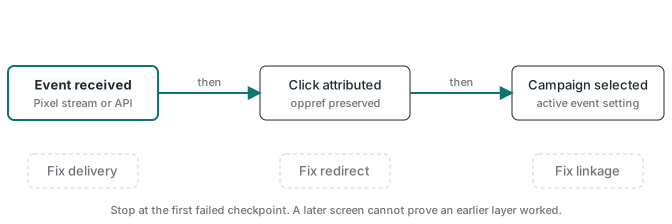
A ChatGPT Ads conversion can be received without appearing as a campaign conversion. The fix is to test the measurement chain in order: event receipt, conversion provisioning, click attribution, and campaign linkage. Start with the recent event stream or the Conversions API response. Then verify that the event setting points to the correct source, the landing path preserved oppref, and the campaign selected that active event setting.
Those are different systems. A browser console message proves that code ran. A successful API response proves that a request passed validation or was accepted. Neither proves that a campaign received credit. This guide starts where the installation guide ends and isolates the layer that failed.
| What you can prove | Where to check | What it does not prove |
|---|---|---|
| Pixel code ran | Browser console with debug: true | OpenAI received the event |
| Recent Pixel event exists | Conversion event stream | The event was attributed |
| Server request validated | Conversions API with validate_only: true | The event was saved |
| Event setting is active | Conversion setup | A campaign selected it |
| Campaign selected the event | Campaign configuration | A real click carried oppref |
Why does ChatGPT Ads show no conversion?
An empty conversion column usually points to one of three boundaries. OpenAI may not have received the event. It may have received the event but lack the click reference needed for click-through attribution. Or the event setting may exist without being selected by the conversion-optimized campaign you are inspecting. Test those boundaries in that order because each result narrows the next check. OpenAI’s conversion setup documentation separates recent event receipt from attributed reporting. Its campaign documentation separately requires an active standard event setting connected to one active source. Treat the Ads Manager total as the last output of a chain, not the first debugging screen. If you begin with the total, every upstream failure looks identical. If you begin with receipt, the problem becomes transport, attribution, or campaign configuration.
Did OpenAI receive the event?
Test receipt before touching the campaign. For browser events, initialize the Measurement Pixel with debug: true, trigger one known event, and inspect both the console and the network request. Then query the recent Pixel event stream if your account has access. OpenAI says that stream returns up to 50 Pixel SDK events received during the previous 15 minutes. It also states that the stream confirms receipt only, not attribution or reporting. For server events, use validate_only: true to check the payload without saving it, then send one real event with validation disabled. Do not count the validation result as a conversion. If a batch fails, remember that one invalid event makes the full batch fail. A clean test uses one event, a fresh event ID, the correct Pixel ID, and a timestamp inside the documented window.
The general ChatGPT Ads conversion tracking guide covers the browser and server payloads. For this troubleshooting pass, record only four facts: the event name, event ID, Pixel ID, and the exact time OpenAI received it.
Was conversion tracking provisioned in the right order?
Provisioning order matters because each resource returns an identifier needed by the next one. First create the web conversion source. Its response contains both a source id and a pixel_id, and they are not interchangeable. Use the source id, such as clidsrc_123, inside source_ids when you create the event setting. Use the pixel_id when you initialize the browser Pixel or send a Conversions API event. Next create the event setting with one source, a supported event type, and the documented 30-day attribution window. Then implement delivery and prove receipt. Only after that should you create a conversion-optimized campaign that selects the event setting. This is the order in OpenAI’s API partner setup. A Client data source not found response means the source referenced by the event setting does not exist in the current ad account. A 404 on pixel or key provisioning can mean the account has not been enabled for those operations.
- Confirm the ad account and its API access.
- Create the web conversion source.
- Save both the source ID and Pixel ID under distinct names.
- Create the event setting with the source ID.
- Install the Pixel, the server sender, or both.
- Prove one event reached OpenAI.
- Create the campaign with the intended event setting selected.
Did a redirect remove oppref before the Pixel loaded?
The Measurement Pixel captures oppref from the landing page URL and stores it in a first-party __oppref cookie. That documented behavior gives you a precise redirect test. Follow one real test click through every redirect and inspect the address bar before the Pixel initializes. If the query parameter vanished, the Pixel cannot capture it. This conclusion follows from the documented capture mechanism, even though the docs do not prescribe a specific redirect configuration. Common losses include a canonical-domain redirect that rebuilds the URL without its query string, a locale router that sends the visitor to a clean path, or application code that replaces the URL too early. Preserve the full query string through required hops. Better still, point the ad at the final landing URL. The oppref guide covers storage beyond the first page.
For a server event, pass the original oppref yourself when it is available. The Conversions API does not collect it from a browser. A server request may be perfectly valid while the campaign remains unable to connect it with an eligible ad click.
Is the conversion event linked to the campaign you are checking?
A conversion event setting and a campaign are separate resources. The event setting response includes a campaigns field. An empty list tells you that the API did not return a campaign association for that setting. For conversion-optimized cost-per-click, create the campaign with bidding_type set to conversions and pass exactly one active standard event setting ID in conversion_event_setting_ids. The event setting must belong to the same ad account and connect to one active conversion source. OpenAI does not allow a custom event as the optimization goal. It also says the selected goal and conversion event cannot be changed after campaign creation. If the wrong event was selected, pausing and editing other fields will not repair that relationship. Create a new campaign with the correct event setting, keep it paused while its children are checked, and activate it only when the full chain is ready.
This checkpoint answers an optimization question. Event receipt still has to be healthy, and oppref still has to survive the landing path for click-through attribution.
Are you looking at the right reporting number?
OpenAI separates click-through conversions from view-through reporting. The Conversions total remains the click-through conversion count. When view-through reporting is available, those conversions use a fixed one-day window and appear as a separate campaign-level metric. They are not added to Conversions, and they do not change conversion optimization, billing, CPA, or post-click conversion rate. That distinction can make a working setup look inconsistent when an operator expects one total to include both paths. Compare like with like: recent event receipt for transport, the Conversions column for click-through attribution, and the separate view-through metric for eligible impression-based results. A received event with no eligible click is not evidence that campaign reporting is broken.
What is the fastest troubleshooting checklist?
Run one controlled event from start to finish and stop at the first failed check. A real test order or lead is better than a page refresh because it exercises the event your campaign actually uses.
| Check | Pass condition | Fix when it fails |
|---|---|---|
| Account enablement | Pixel, key, and conversion operations are available | Ask the OpenAI partner contact to enable the account operation named by the error |
| Source identity | Event setting uses the source ID from the current account | Replace the wrong source reference and recreate the event setting if needed |
| Browser receipt | Test event appears in the recent event stream | Inspect Pixel initialization, consent, CSP, event name, and network delivery |
| Server receipt | Real event is accepted with validation disabled | Fix auth, timestamp, Pixel ID, payload shape, or the invalid event in the batch |
| Click reference | Final landing URL and stored record retain oppref | Preserve the query string and persist the value before checkout or navigation |
| Campaign relationship | Intended active standard event is selected by the intended campaign | Create a new conversion-optimized campaign with the correct setting when selection is wrong |
| Reporting surface | Click-through and view-through numbers are read separately | Use the metric that matches the attribution path you are testing |
If your team keeps rebuilding this chain for client accounts, Advanced Tracking Academy for media buyers provides maintained server-side GTM containers and a repeatable debugging workflow. The value is having the same receipt, attribution, and campaign checks ready for the next implementation.
Keep the final test record. Save the source ID, Pixel ID, event setting ID, campaign ID, event name, event ID, landing URL, stored oppref state, and receipt time. When the count changes later, that record tells you which relationship was known to work. Troubleshooting then becomes a comparison, not a rebuild.