
We added ChatGPT Ads conversion tracking to our own checkout before a single client asked for it. Not as a lab exercise, on the real site, on the same server-side setup that handles our Stripe subscriptions.
The reason was simple. When a new ad platform opens, the tracking questions arrive about three months before anyone has written down the answers, and we would rather find the sharp edges on our own revenue than on someone else’s.
Here is what the build actually involved.
The easy part
Do not hand-roll the tags. Stape publishes two open-source GTM templates under Apache 2.0, one for the web container and one for the server container, and they cover the surface properly.
The web template maps GA4-style event names onto OpenAI’s names, so page_view becomes page_viewed and purchase becomes order_created, forwards anything unmapped as a custom event, takes an event ID for deduplication, and respects Google Consent Mode.
The server template handles the Conversions API: Pixel ID and conversion key, GA4 event-name inheritance, SHA-256 hashing that is smart enough to skip values already hashed, and a priority chain for resolving the click ID.
Between them, most of a standard setup is configuration rather than code. That surprised us. Three months into a platform’s life, the tooling is usually much worse than this.
The part that needed thinking
Our conversions do not happen in a browser.
Like most subscription businesses, the event that matters is a Stripe webhook. Stripe tells our server that a payment settled, and that is the moment we count a purchase, because it is the only moment we know money actually moved. A thank-you page tells you a browser loaded a URL, which is not the same claim.
A webhook has no cookies and no URL parameters. So at the instant we most want to say which ChatGPT ad earned this, we have the least context.
This is a solved problem, but you have to solve it deliberately. The shape is a round trip:
- When the visitor lands, read
oppreffrom the URL and__opprefand__obreffrom the cookies the pixel sets. - Persist those against an identifier the webhook will also carry. We already run a Stape Store for exactly this, keyed on our own index value, because it is how
_fbcand_fbpsurvive to the Meta conversions leg. - When the webhook arrives, look the click ID back up and attach it to the Conversions API event.
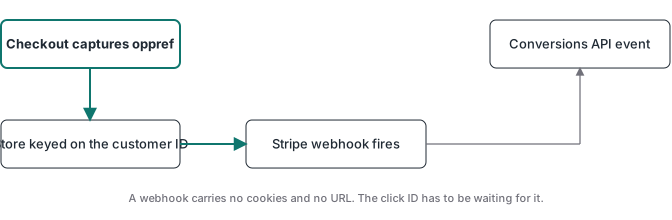
The good news is that if you already do this for Meta, you are not building anything new. We appended three rows to writers that were already running and the existing machinery carried the new fields along. Adding a platform to a stack that already round-trips identifiers is genuinely cheap. Building that round trip for the first time is the actual work.
What we got wrong first
We assumed the Conversions API would pick up the click ID the way the pixel does. It does not, and OpenAI says so in a single sentence that is easy to read past: capture the value yourself and pass it with the server event.
It is not a subtle failure either. Conversions still arrive. They count. They just stop belonging to any specific ad, so the number in your dashboard looks fine and the attribution underneath it is empty. If we had shipped that to a client and they had gone looking a month later, the fix would have been retroactive and there is no backfill.
The second thing worth knowing before you plan around this platform: phone numbers are not accepted for matching. Not raw, not hashed. Meta takes them, OpenAI does not, and there is no setting. If your leads are phone-first, your match rate here will be lower than the same audience on Meta and no configuration changes that.
Proving it works without a dashboard
This is where we expected to be stuck, and it turned out to be the most interesting part.
The obvious check is the Event flow view in Ads Manager. That works, but it means a person clicking through a browser, which is not something we can run on a schedule or hand to an automated check.
The Advertiser API looked like the answer and is not. There is a conversions insights endpoint, but it reports attributed conversions and only at campaign, ad group and ad level. If no campaign is linked, and ours was not because we were not spending yet, it returns nothing regardless of how many events are landing. An empty result there means nothing at all about whether your pixel works. That distinction cost us an hour.
Two checks did work, and both run headlessly:
A dry run against the Conversions API. Send a real payload with validate_only set to true. Nothing is stored, and a valid batch comes back as {"accepted_events": 1}. That proves the Pixel ID, the conversion key and the event schema all agree, which is most of what can be misconfigured on the server leg.
A scripted browser load. Open the site with a fake click ID on the URL, then watch the network. We saw the SDK load from bzrcdn.openai.com, a config fetch for our Pixel ID, and event batches posting to bzr.openai.com. Both __oppref and __obref were set. That is the web leg confirmed end to end, with no dashboard and no human.
Neither check needs a campaign running, which matters, because most people wire tracking before they spend.
What we would tell someone starting today
Provision first and in order: data source, then conversion event, then conversion key, then link the event to the campaign. It is strict, it matches on exact names, and nothing backfills. Config before traffic.
Point ads at final URLs. A redirect that drops the query string removes the click ID before any tag runs, and it is the single most common way this breaks.
Reuse the event ID you already share between browser and server for Meta. There is no reason for a second identifier and one is far easier to debug.
Then test the way a machine would, not the way a dashboard would. A dry-run API call and a scripted page load tell you more, faster, than a conversion column that has a 24 to 48 hour reporting lag.
Two things this will not fix, and both are worth checking before you invest: advertisers can only buy in the US, UK, Canada, Australia, New Zealand, Japan and South Korea right now, with Brazil and Mexico listed as coming soon and the EU not served. And OpenAI screens restricted categories and withholds ads near sensitive topics, the same way every platform does. Cleaner measurement does not make a restricted category eligible, and no container changes that.