
GA4 (not set) revenue means Analytics recorded revenue but could not populate the dimension you selected for that revenue row. When the affected purchase came through Measurement Protocol, the first suspects are the connection to the browser session, the request format, and the event timestamp. The purchase can arrive while its session source, medium, campaign, landing page, or another dimension remains unknown.
This is why the percentage of (not set) sessions can look harmless while the revenue percentage is serious. In one practitioner audit shared with our team, fewer than 5% of sessions were labeled (not set), yet those rows held more than 29% of revenue. That is one diagnostic observation, not a GA4 benchmark. It shows why teams should weight the issue by business value instead of looking only at the session count.
The short version:
- Confirm which dimension and scope show
(not set). - Separate browser purchases from Measurement Protocol purchases.
- Preserve the browser
client_idand session identity before the checkout or webhook loses them. - Send a JSON POST with the correct header and a valid event timestamp.
- Validate the payload, then prove attribution in GA4. A
2xxresponse is not that proof.
What does (not set) mean in a GA4 revenue report?
(not set) is GA4’s placeholder when it has no information for the dimension in the report. The meaning therefore changes with the dimension. Google says Session source or medium can become (not set) when the session has no session_start event. Landing page can be (not set) when there is no page_view. A custom dimension can show it when the parameter was absent. Start by recording the exact report, dimension, metric, date range, property time zone, and filters. Do not group every (not set) row into one tracking defect. For this article, the target case is revenue from a server-originated purchase that should inherit the source, medium, and campaign of an earlier online session. That link needs the same web client identity, the correct session identity, and timing that fits the original session. Google’s guide to (not set) values is the baseline for distinguishing missing session data from a missing field in another dimension.
Why can (not set) revenue be much larger than (not set) sessions?
Revenue concentration can make a small row count expensive. Suppose most ordinary browsing sessions are connected correctly, but purchase events arrive later from a webhook with incomplete session identity. The session report may still look healthy because the browser collected thousands of valid visits. The relatively small group of server-originated purchases can hold a much larger share of revenue, so the revenue-weighted error exposes a defect hidden by the session percentage. The reported case with less than 5% (not set) sessions and more than 29% (not set) revenue fits that pattern, but we do not have its row-level export, sample size, time window, or uncertainty interval. Use it as a reason to investigate, not as an expected ratio. Reproduce the calculation in your own property by comparing (not set) revenue with total revenue for the same fixed period and dimension. Then remove refunds, test transactions, duplicated IDs, and mismatched time zones before making a claim about impact.
How does Measurement Protocol attach a purchase to a session?
For a web stream, the request-level client_id identifies the web client and the event-level session_id identifies the session. Google’s current Measurement Protocol use-case guide says session attribution requires session_id, requires the request within 24 hours of the online session start, and requires an overridden timestamp_micros to fall between the session start and end. Events that meet those conditions can appear with the same source, medium, campaign, geographic information, and other session attributes as online events from that session. Measurement Protocol supplements browser tagging; it does not reconstruct the lost browser context by itself. Capture the identifiers while the visitor is still on your site, persist them against an opaque checkout or customer reference, and retrieve that record when the paid webhook arrives. The hosted-checkout tracking guide shows the same round trip for click IDs and payment confirmation.
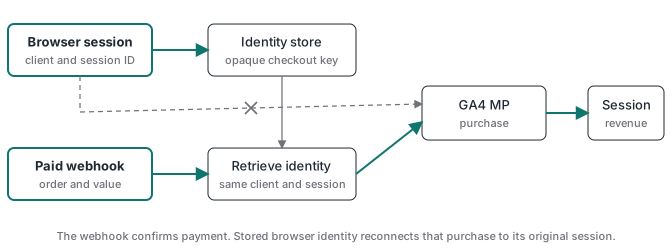
Which Measurement Protocol fields should you validate first?
Validate identity before adding more marketing parameters. Google’s current web Measurement Protocol reference accepts a client_id in its standard two-number format or as the full client cookie value. It accepts a positive session_id as a number or a string, a value from the GTM Analytics Session ID variable, or the full session cookie. Therefore, a JSON number is not inherently the bug. The dangerous values are blank strings, null, NaN, a malformed cookie, an identifier from another browser, or a session that does not belong to that client. Validate transaction_id as a stable string and make webhook processing idempotent so retries do not create more than one purchase. When the event happened earlier, set timestamp_micros to the actual event time within the supported window. Keep currency, value, and items consistent with the paid order.
| Field | What to preserve | Failure to test |
|---|---|---|
client_id |
The web client’s original value or supported full cookie value | A generated server value creates a different user history |
session_id |
The matching positive session value or supported session cookie | Missing, invalid, stale, or mismatched identity loses session context |
timestamp_micros |
The actual purchase time when overriding the request time | A timestamp outside the original session cannot support that session link |
transaction_id |
One stable string for the paid order | Retries or changed IDs can distort purchase counting |
currency and value |
The settled order currency and amount | Revenue may be unusable even when the event appears |
Can the Content-Type header fail without an obvious error?
Yes. Google documents the transport as an HTTPS POST with a JSON body and Content-Type: application/json. Set that header explicitly. More importantly, do not use the response status as a collection receipt. Google’s reference says Measurement Protocol returns 2xx when the HTTP request is received and does not return an error code when a payload is malformed, incorrect, or not processed. A missing or wrong content type can leave your implementation outside the documented request format while the sender still records a successful HTTP exchange. Use the Measurement Protocol validation server at /debug/mp/collect with strict validation during development. An empty validationMessages array proves the tested structure passed validation, but it still does not prove that your production secret, property, stored identity, or reporting attribution is correct. Follow with one controlled purchase in DebugView or Realtime and a processed report check.
POST /mp/collect?measurement_id=G-XXXXXXXXXX&api_secret=REDACTED HTTP/1.1
Host: www.google-analytics.com
Content-Type: application/json
Does user_data restore UTM matching on Measurement Protocol purchases?
user_data can improve user and conversion measurement when it is implemented with the required consent, normalization, hashing, and user_id, but Google does not list it as a requirement for session attribution. The official requirements are session identity and timing. We have seen a practitioner report that transactions matched their UTMs after user_data was added and failed to match when it was removed. That is useful implementation evidence, but it is not a controlled test and does not establish that user_data carried the UTM values. The payload may also have changed its client_id, session_id, timestamp, consent state, or request construction. Treat the report as a prompt to diff the entire request. If you send user-provided data, follow Google’s user-provided data requirements, including SHA-256 hashing for sensitive fields. Never add email or phone merely to compensate for missing session identity. Collect and use it only with an appropriate legal basis and consent state.
How should you debug GA4 (not set) revenue in order?
Use a fixed test transaction and stop at the first failed layer. This keeps a reporting symptom from turning into random tag edits.
- Name the broken row. Record the exact scoped dimension, revenue metric, date range, time zone, and filters. Session source or medium is not interchangeable with event-scoped source or medium.
- Reconcile business truth. Confirm the order was paid, unique, and assigned one stable transaction ID. The Stripe webhook guide explains why payment confirmation must precede the analytics event.
- Inspect the browser identity before checkout. Capture the supported
client_id, session value, campaign context, consent state, and timestamp. Store them against an opaque reference that the webhook can return. - Inspect the final JSON and headers. Read the actual outbound bytes. Check the measurement ID, content type, event name, transaction ID, identity fields, timestamp, currency, and value. Do not trust the tag template preview alone.
- Validate the same payload shape. Send a redacted test to the debug endpoint with strict validation. Fix every validation message.
- Prove destination behavior. Send one controlled production test, check DebugView or Realtime for receipt, then wait for processed reports and confirm the expected session source or medium.
- Run negative controls. Remove or corrupt one identifier in a separate test property or isolated test stream so the monitor proves it can detect the failure.
After the repair, add daily reconciliation between paid orders and distinct GA4 transaction IDs. The tracking monitoring guide shows how to alert on a changed gap instead of waiting for a monthly report.
What does server-side GTM fix, and what does it not fix?
Server-side GTM gives you a controlled place to validate webhook payloads, retrieve stored identifiers, set the request header, block invalid fields, and log the outbound response. A managed host such as Stape can run that container without your team maintaining the underlying server. None of this creates session identity after it was lost. The browser or landing-page flow still has to capture the correct identifiers and consent state before the visitor leaves. The server route also does not make a 2xx response equal a processed event, and it does not make GA4 a payment validator. Use the paid webhook as the business trigger, the stored browser record as attribution context, the server container as the transformation and delivery layer, and GA4 as the reporting destination. Advanced Tracking Academy provides prebuilt client-side and server-side containers for teams implementing that contract across client accounts. The goal is not more event volume. It is one confirmed purchase with an identity chain you can inspect from landing page to report.