
Server-side tracking does not recover a fixed percentage of events. One Stape-hosted setup showed up to about 15% more server volume. One iPhone-heavy report said more than 70% of web events were blocked. A PageView screenshot showed 8,555 server deliveries against 3,251 browser deliveries during the same reported period, making the server line 2.63 times the browser line.
Those numbers are receipts from different sites, traffic mixes, event rules, and measurement screens. They show that browser loss can be material. The size of that loss must be measured on your own setup. The honest recovery number is the count of valid, unique business events that become observable only after the server path is added, with consent and deduplication working.
This article shows what each reported number can support, what it cannot establish, and how to produce a defensible measurement from your own data. If you need the architecture first, read what server-side tracking is before working through the receipts.
How many events does server-side tracking recover?
The only accurate default answer is “it depends on the loss already present.” Server-side tracking may recover very little on a clean site with little blocking, or much more when the audience is mobile-heavy, the standard loader is frequently blocked, or conversions happen after the browser has left the journey. A payment webhook can also deliver an event the thank-you page never had a chance to send. These mechanisms belong in separate rows because they solve different failures. Two figures here express a source gap relative to browser volume, but they came from different populations and setups. The 70% figure measures the reported share of web events blocked. Combining the three into a recovery range would be invalid. Your own source-of-truth reconciliation is the result that can support an operational decision.
| Observed case | Reported result | What it can support | What it cannot support |
|---|---|---|---|
| PageView source comparison | 8,555 server vs 3,251 browser deliveries | A large source gap existed in that window | Population and interval were not supplied, so this cannot establish 5,304 unique visitors or a universal rate |
| ATA client review on a Stape-hosted setup | Up to about 15% more server volume than web volume | A moderate observed gap can matter at scale | Raw rows, sample size and interval were unavailable, so this cannot isolate Custom Loader as the cause |
| iPhone-heavy delivery report | More than 70% of web events blocked | A severe mobile-heavy case can exist | Sample size and interval were not reported, so this is not an iOS average or forecast |
What can 8,555 server events versus 3,251 browser events show?
A screenshot shared in a private practitioner group in August 2026 showed one PageView with 8,555 events attributed to the server source and 3,251 attributed to the browser source over the same reported period. The source lines differ by 5,304 deliveries, and the server count is about 163% higher relative to the browser count. The table above records the limits of that evidence. To test whether the difference represents recovered actions, confirm that both paths use the same PageView definition and time window. Then inspect shared event IDs and the platform’s deduplication result. Different triggers, duplicate server requests, time-zone boundaries, filters, or a browser tag that failed for reasons unrelated to privacy can widen the gap.
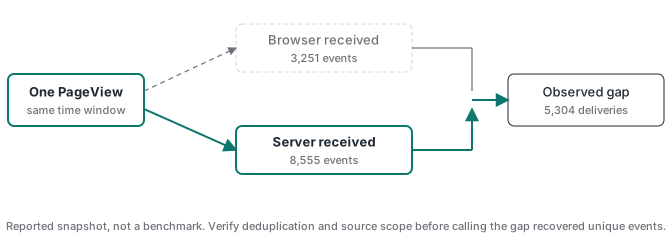
The ratio is still useful. It tells the implementer where to look. If the server line is much larger, inspect blocking, loader delivery, mobile mix, and server-only sources. If the browser line is larger, check transport from the web container to the server, server availability, consent handling, and tag failures. Read the two lines together as a diagnostic pair.
Why did another Stape setup show only about 15%?
In an ATA client review recorded in April 2026, the operator of a Stape-hosted server container reported that server event volume ran up to about 15% above web volume. The setup used a first-party Stape route, including a custom loader path. The evidence limits are in the table above. Server routing, first-party script delivery, browser mix, tag logic, and ad-blocker resistance were all part of the running system, so the 15% belongs to the full setup. To isolate the loader effect, keep tag logic, consent behavior, and server routing stable. Annotate its activation date and compare the recovered-request metric before and after the change.
Stape now offers a more direct receipt. Its Analytics dashboard reports the number and percentage of requests recovered from ad blockers by Custom Loader. This view excludes offline server-to-server traffic such as CRM or payment webhooks, according to Stape. Keep those sources in a separate reconciliation.
Can iPhone-heavy traffic really lose more than 70% of web events?
One practitioner report reviewed for this article said web-event blocking exceeded 70% when most delivery went to iPhone users. The evidence limits are in the table above. The report is useful as a triage signal because several filters can stack: browser tracking prevention, content blockers, standard script URLs caught by lists, consent denial, in-app browser behavior, and slow pages that users leave before a tag runs. Apple’s WebKit tracking-prevention documentation confirms that Safari blocks third-party cookies by default and limits several forms of script-writeable storage and link decoration. Apple publishes no 70% figure. Run a device-level audit on your site before making a recovery forecast.
Split your measurement by browser and device. Compare iOS with Android and desktop over the same dates, campaign mix, and landing pages. A large iOS gap may point to loader blocking or storage loss. It may also reveal a slower mobile page, a consent banner that behaves differently, or an in-app browser problem. Use device type to decide what to inspect next.
What does server-side tracking recover, and what stays lost?
Server-side tracking recovers delivery when a valid event can reach a first-party collection endpoint or originate from a backend system even though the browser-to-platform call fails. It can also preserve identifiers in a controlled first-party flow and forward one normalized payload to several destinations. Google’s server-side tagging fundamentals describe the server container as a buffer that can validate, parse, modify, or block requests before forwarding them. That control can improve data quality. It does not make missing consent, invented customer data, or false business events acceptable. If the browser never created the event and no backend system observed the action, the server has nothing truthful to recover. If the customer denied the relevant consent, the server path must honor that choice.
Think in failure classes:
- Blocked loader or request: a first-party loader and endpoint may restore delivery.
- Browser closes before the event: a signed payment or CRM webhook may provide the later event.
- Identifier expires or disappears: first-party server-set storage may improve continuity within policy and consent limits.
- Bad trigger or mapping: server-side routing will repeat the error until the implementation is fixed.
- Duplicate browser and server copies: stable event names and event IDs are required so one action remains one conversion.
- False conversion: only reconciliation with the order system or CRM can reject it.
The Event Match Quality guide covers a related distinction. Better identifiers can help a destination match an event. You still need separate evidence that it happened once and represented a paid order.
How do you measure your own event recovery rate?
Start with a business event that has an independent ledger. Purchase is usually easier than PageView because the payment processor or order database provides a count and transaction ID. Choose a stable period before the change, then a matched period after it. Keep traffic source, spend, landing page, consent setup, and event definition as comparable as possible. Record browser delivery, server delivery, deduplicated destination events, and valid source-of-truth transactions. The practical recovery count is the number of valid unique actions present after browser-plus-server delivery that would be absent from the browser-only path. Divide that by eligible source-of-truth actions for a coverage rate. Report a separate metric named browser-to-combined uplift. The two calculations answer different questions.
Use this audit sequence:
- Pick one event and freeze its definition.
- Record the source-of-truth denominator and IDs.
- Confirm the browser and server paths share an event name and event ID when they describe the same action.
- Run a real control event through both paths and inspect the requests.
- Check destination-side receipt and deduplication. HTTP acceptance covers only the sender’s delivery attempt.
- Compare browser-only coverage with browser-plus-server coverage over matched windows.
- Break the gap down by device, browser, consent state, and traffic source.
- Repeat after enough volume to keep a small daily swing from driving the conclusion.
For a concrete implementation pattern, the server-side GTM guide explains how the web container sends a single stream to the server container. The Meta Conversions API with GTM guide covers payload quality and the difference between delivery, matching, deduplication, and attribution.
How should you use Stape Custom Loader as a receipt?
Use Stape Analytics for the loader-specific number and your business ledger for the conversion-specific number. Stape’s Custom Loader documentation says the loader routes GTM and GA4 scripts through a first-party domain or same-origin path, reducing the effect of blockers that target standard script and request patterns. After enabling it, verify that the custom route returns successfully, remove any standard loader that would run beside it, and watch the recovered-request metric. Then reconcile Purchase or Lead against the backend. Keep recovered PageView requests, sales, attributed conversions, and campaign outcomes as separate measurements.
A controlled rollout is cleaner than a before-and-after story with five simultaneous changes. Turn on the first-party loader, keep tag logic stable, annotate the date, and monitor recovered requests. Then add or repair server tags in a second documented change. If payment webhooks are part of the design, reconcile them in their own row because Stape Analytics explicitly excludes offline server-to-server events.
Should you replace browser tracking with server-side tracking?
For most web measurement, keep a thin browser path and add the server path with proper deduplication. The browser sees page context, consent interaction, and click identifiers at collection time. The server can control forwarding, protect secrets, enrich from permitted backend data, and deliver events that originate outside the page. Google’s introduction to server-side tagging describes this flow as browser or app data reaching a server container that transforms it into events before tags route it onward. A backend-only setup can be right for payment or CRM events. Recreating browser context requires storing it correctly at collection time.
Advanced Tracking Academy’s tracking program includes the browser and server structure, deduplication, webhook validation, and the test sequence needed to produce your own receipts. Your final record should show exactly which valid events were missing, which path restored them, and which destination received one deduplicated copy.