
The Meta Conversions API (CAPI) is a server-to-server connection that sends conversion events, things like purchases, leads, and registrations, directly from your server to Meta instead of relying only on the Meta Pixel in the visitor’s browser. The browser version of an event can be blocked or dropped before it ever reaches Meta. The server version travels from infrastructure you control, so it lands.
That’s the definition. The reason it matters is the gap you can see in Ads Manager: your Pixel reports far fewer purchases than your payment processor actually settled. Ad blockers, Safari’s tracking prevention, and declined cookies all take a cut of browser events. The Conversions API is how you send Meta the conversions the browser lost.
I run tracking implementations for clients, and I built Advanced Tracking Academy around the containers I deploy in production. This guide covers what the Conversions API is, how it differs from the Pixel, and how to run it properly through a GTM server container, including the two steps where most setups break: deduplication and webhook validation.
Meta Conversions API vs the Meta Pixel
People treat this as a choice. It isn’t. The Pixel and the Conversions API are two channels for the same events, and Meta’s recommended setup runs both.
| Meta Pixel | Conversions API | |
|---|---|---|
| Where it runs | Visitor’s browser | Your server |
| Blocked by ad blockers | Often | No |
| Survives Safari ITP | Cookies capped short | First-party, longer-lived |
| Carries hashed customer data | Limited | Yes (email, phone, more) |
| Sees in-browser context | Yes | Only what you forward |
| Setup effort | Paste a snippet | Server, token, configuration |
The Pixel is good at browser context: the page, the referrer, the click. The Conversions API is good at reliability and at carrying richer customer data for matching. When you run both and tie each pair of events together with a shared ID, you get the best of each without double-counting. More on that ID in the deduplication section, because getting it wrong is the most common mistake I find in audits.
If you want the wider picture of why server-side delivery beats browser-only tracking, I wrote a full guide to server-side tracking that covers the data decay problem in detail. The cookie mechanics behind that decay, who sets first-party versus third-party cookies and how each browser treats them, are in the first-party vs third-party cookies guide. This article is the Meta-specific version of that story.
Why send Meta events server-side
Three things change the moment your purchase events come from a server instead of only the browser.
More events reach Meta. Blockers and privacy features work from lists of known tracking domains. A browser Pixel call to Facebook is on those lists. A server call from your own infrastructure is not, so it gets through. The practical result is that the conversion count Meta optimizes on gets closer to the real number. The event recovery measurement guide shows why the uplift varies and how to reconcile it against your own ledger.
Higher Event Match Quality. Meta scores eligible website events by how useful their customer information is for matching, and it calls this Event Match Quality. Server events can include hashed emails, phone numbers, and stable customer IDs that may not exist on an anonymous browser event. The full set of customer information parameters is covered in the Facebook Conversions API guide, and the EMQ score guide explains why each event has a different natural ceiling.
You decide what Meta receives. From the server you write the contract. This event carries the order value and a hashed email, that one strips the raw IP. For privacy work under GDPR or CCPA, enforcing the data flow beats hoping a browser script behaves.
None of this removes the need for consent. A server still has to respect a visitor who declined tracking. The Conversions API moves where events come from, not whether you are allowed to send them. Google has its own equivalent for its tags in Consent Mode v2, which adjusts what Google Ads and GA4 record when a visitor declines, but Consent Mode governs only Google products and does not decide what Meta may receive.
How the Conversions API works through a GTM server container
You can call the Conversions API directly with custom code. For a single platform on a single site, that’s fine. The moment you also send to Google Ads, TikTok, and GA4, writing and maintaining separate integrations for each becomes the job nobody wants.
A Google Tag Manager server container (sGTM) solves that. It runs the GTM you already know, with tags, triggers, and variables, except on a server instead of in the page. The flow looks like this:
- The browser sends one event stream to a tagging server on your own subdomain, something like
data.yourdomain.com. To the browser this is first-party traffic. - The server container receives the event, enriches it with customer data, and decides what each platform gets.
- The Conversions API tag forwards the purchase to Meta from the server, alongside the Google tag and the TikTok Events API tag pulling from the same event.
You configure Meta once, in one place, next to every other platform. That shared server is why most professional setups standardize on sGTM rather than hand-coded calls. You need somewhere to host the container: Google Cloud Run if you want to operate it yourself, or a managed host like Stape if you would rather not, which is the route most non-developers take.
Setting up the Meta Conversions API with GTM server-side
A realistic path, whether you build it or deploy a pre-built container:
- Create a system user and token. In Meta Business Settings, add a system user, give it access to your ad account and dataset, and generate a long-lived access token. This is what authenticates your server to Meta.
- Provision the server container. Create the sGTM container in GTM and host it. A managed host has you running in minutes.
- Point a first-party subdomain at it, so browser requests stay first-party.
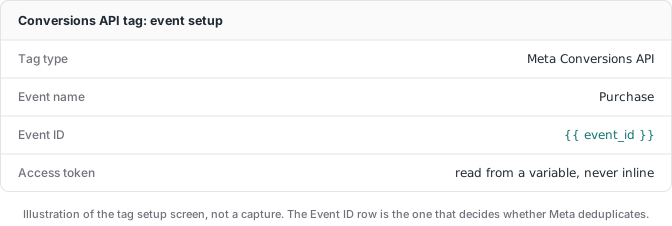
- Add the Conversions API tag in the server container, paste in the token and your dataset ID, and map your event fields: value, currency, hashed email, hashed phone, the Meta click ID (
fbc), and browser ID (fbp). - Set up deduplication so the Pixel and the API don’t both count the same purchase. See the next section.
- Test before you trust it. Use the server container’s preview mode and Meta’s Events Manager test events tool. Run a real test purchase and confirm Meta receives exactly one deduplicated event with good match quality.
Steps 4 and 5 are where DIY setups go wrong, usually quietly, which is why the count looks fine in a dashboard while the underlying events are duplicated or unmatched.
Deduplication: the step most setups break
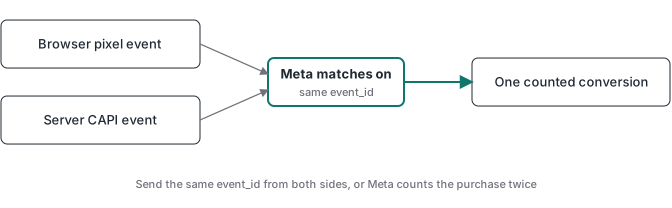
When you run the Pixel and the Conversions API together, Meta receives two copies of every purchase: one from the browser, one from the server. Without deduplication, your reported conversions inflate and Meta optimizes on a number that isn’t real.
The fix is a shared identifier. Both the browser event and the server event carry the same event_id (and ideally the same event_name and the fbp browser ID). Meta sees two events with one ID, understands they are the same conversion, and keeps one. The browser and server become two reliable paths to a single counted event rather than two events.
The detail people miss: the event_id has to be generated once and shared between both channels. If the browser makes up one ID and the server makes up another, Meta can’t pair them and deduplication silently fails. In a server container setup, you generate the ID on the page, send it with the Pixel event, and pass the same value through to the server tag.
Webhook validation: send Meta only real purchases
Deduplication keeps you from counting a purchase twice. Webhook validation keeps you from counting purchases that never happened.
Here’s the failure mode I see most in audits: the purchase event fires when the visitor lands on the thank-you page. Refresh the page, it fires again. A bot hits the URL, it fires. The payment fails after redirect, it fires anyway. Now Meta is optimizing toward people who load a URL, not people who paid.
The fix is to make the payment gateway the source of truth. Stripe, or whatever processor you use, sends a webhook to your server when a charge is actually confirmed. The server matches that webhook against the stored browser session (the click IDs and attribution data captured earlier) and only then fires the Conversions API event to Meta. Every purchase Meta receives maps to real, settled money.
That validation layer is the difference between a Conversions API setup that sends events and one that sends events you can trust. If Stripe is your processor, the webhook-validated flow is its own walkthrough in the Stripe conversion tracking guide. It’s the architecture every ATA container ships with, because thank-you-page events stopped being good enough years ago.
Conversions API Gateway vs a server container
You’ll see Meta’s Conversions API Gateway mentioned as another way to do this. The Gateway is a Meta-backed service (often deployed through a partner) that sets up server-side event sending with less configuration than a full GTM container. The full Conversions API Gateway setup guide covers its Pixel prerequisite, first-party domain, test sequence, hosting cost, and operational limits.
The trade-off is control and scope. The Gateway is Meta-focused and largely a managed black box. A GTM server container is platform-neutral: the same server that feeds Meta also feeds Google Ads, TikTok, and GA4, and you can add custom logic like webhook validation that a turnkey gateway won’t do for you. If Meta is the only platform you’ll ever care about, the Gateway is a fast start. If you run multi-platform tracking, or you want gateway events validated against real payments, a server container is the more flexible foundation. That comparison deserves its own breakdown, which I wrote up in the Conversions API Gateway vs server-side GTM guide.
Is the Meta Conversions API free, and what does it cost
Meta charges nothing to receive Conversions API events. The cost is the infrastructure that sends them. Two numbers to budget:
- Hosting: a managed server container starts around $20 per month per site. Cloud Run can be cheaper at low traffic if you operate it yourself.
- Setup time: the real variable. Built from scratch, a correct CAPI setup with deduplication and webhook validation is days to weeks the first time. Pre-built containers compress that to about an hour.
For any advertiser spending real money on Meta, the recovered conversions and better match quality pay back the hosting many times over. If your spend is small, fix the offer before the plumbing.
Where to go from here
If you’re implementing this, the next thing worth reading is the server-side tracking guide for the full picture of how the server container fits the rest of your stack. For the container itself, where it runs and how to host it, the server-side GTM guide is the deeper walkthrough. The Conversions API Gateway comparison above is now its own Gateway vs server-side GTM guide.
And if you’d rather deploy than build: the ATA Meta CAPI container ships with deduplication and webhook validation already wired. Import, configure, and go live in under an hour, $27 per month with the price locked while you stay subscribed.