
Google Consent Mode v2 is a signal framework that tells Google’s advertising and analytics tags how to behave based on a visitor’s consent choice. When a visitor accepts cookies, the tags send their normal signals. When the visitor declines, Consent Mode changes what the tags do instead of firing regardless. Version two added two new signals, ad_user_data and ad_personalization, introduced in November 2023 with enforcement expanded through 2024 as Google tightened its European consent requirements.
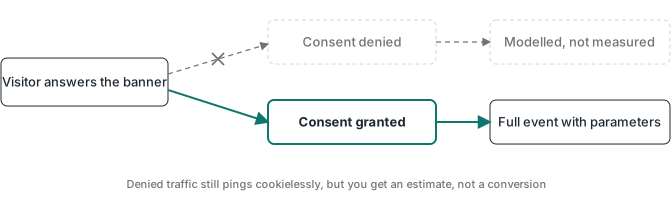
The measurement consequence is direct. A visitor who declines tracking produces no cookie based data for that session, so the conversions and visits that came through them are not recorded directly. Consent Mode is Google’s mechanism for handling that gap. In its Advanced configuration the tags keep sending a cookieless ping when consent is denied, which carries observations about what happened without a persistent cookie identifier. Behavioral modeling then estimates the users and sessions Google could not see directly, and conversion modeling estimates the key events and attribution that were lost.
This article covers the measurement side of Consent Mode v2: what the four signals do, how the two modes differ, how modeling fills the gap, and where it stops. I implement tracking for clients, and I built Advanced Tracking Academy around the containers I use in production. The wider mechanics behind cookie based measurement sit in the server-side tracking guide and the first-party versus third-party cookies guide.
What changed from Consent Mode v1 to v2
Version two did not replace the original framework. It added two consent signals to the two that already existed, so Google’s tags now read four consent types. Each one controls a specific kind of storage and data flow.
| Consent signal | What it controls |
|---|---|
ad_storage |
Whether cookies related to advertising can be written and read |
analytics_storage |
Whether cookies related to analytics, such as session duration, can be written |
ad_user_data |
Whether user data may be sent to Google for advertising |
ad_personalization |
Whether user data may be used for personalized advertising |
The first two signals are the original Consent Mode. They govern storage on the visitor’s device, which is the part cookie restrictions target. The two new signals sit one level up: they govern whether data about the user is sent to Google and used for ad personalization at all, regardless of what is stored locally. Google introduced them to align with the European Digital Markets Act and its EU User Consent Policy. The practical effect is that a setup tracking European traffic now passes all four signals, not two.
The version naming causes confusion here. The “v2” is not a new tag or a separate product. It refers to the two additional parameters inside the same consent state your tags already read. An implementation that sends only ad_storage and analytics_storage is the old behavior, and it does not carry the two new signals that the policy now expects for the applicable advertising features.
Is Google Consent Mode v2 mandatory?
Whether it is required depends on which products you use and where your users are, and the policy does not treat every site the same way. Google’s EU User Consent Policy requires consent and the Consent Mode v2 signals for applicable uses such as advertising measurement, remarketing, and personalization, when those users are located in the European Economic Area, the United Kingdom, or Switzerland. It does not make a custom Consent Mode implementation mandatory for every GA4 property or for all European traffic. A site that uses GA4 only for aggregate analytics, with no Google Ads features, sits under a different obligation than an advertiser running remarketing lists.
The policy is also broader than Google Ads, and the requirements differ by product. Publishers who serve personalized ads through ad products have the specific additional requirement of a Google certified CMP integrated with the Transparency and Consent Framework. Advertisers using Google Ads features for the relevant users need the consent and the signals, and if they are not provided, Google restricts those features rather than serving them normally.
Outside those regions Google’s policy does not apply, but that is not the end of the question. Local laws elsewhere, including various state privacy laws, can impose their own consent duties that exist independently of anything Google requires. Treat the rule as product, role, and region dependent rather than a single yes or no, and treat the choice between Basic and Advanced mode as a decision with a legal dimension that belongs to whoever owns your privacy position, not as a compliance guarantee built into one of the modes.
Consent Mode is also not the thing that makes a site legally compliant. It reads the consent state and tells the tags how to act, but the legal compliance comes from how you collect, store, and document that choice.
How Basic and Advanced mode actually work
Consent Mode has two operating modes, and the choice between them decides how much data a declined visitor contributes. This is the comparison that matters most for measurement.
In Basic mode, when consent is denied, the Google tags do not send measurement data for that visitor at all. Google receives no signal tied to your account for that session. Google Ads can still apply a general model that estimates some lost conversions from aggregate data, but that estimate is not built from your own denied traffic, so it is less precise.
In Advanced mode, the tags still fire when consent is denied, but they send a cookieless ping with the advertising and analytics cookies left out. That extra signal lets Google calibrate a model to your account in Google Ads and enables GA4 behavioral modeling. Advanced mode gives Google more to work with than Basic mode, which is why it is the configuration people mean when they talk about Consent Mode recovering lost data.
| Basic mode | Advanced mode | |
|---|---|---|
| What is sent when consent is denied | Nothing for that visitor | A cookieless ping |
| Google Ads conversion modeling | General, less precise | Account specific, more precise |
| GA4 behavioral modeling | Not available | Available, subject to eligibility |
| Data the visitor contributes when denied | None; Google Ads may estimate losses using a general model | Cookieless pings Google can model from |
Two settings work alongside this choice. wait_for_update tells the tags how long, in milliseconds, to hold processing while they wait for your consent banner to set the consent state. url_passthrough appends the ad click identifier to outbound links on the same domain so it persists across page navigation there. Neither setting strips data on its own; they change how the tags wait and how the click identifier travels within your site.
How the cookieless ping works
The cookieless ping in Advanced mode is easy to misunderstand. It is not an empty or anonymous packet, and modeling does not simply invent a conversion for each one. When consent is denied, the tag still sends a request to Google, but without the advertising and analytics cookies. That request can still carry observations such as pageviews and events, the fact that a key event occurred, the consent state itself, a random identifier generated per page load, and any consent platform data such as a Transparency and Consent Framework string. What it does not carry is the cookie based identifiers the tags would normally rely on.
Whether ad click identifiers leave with that ping is controlled separately by ads_data_redaction. When ads_data_redaction is set to true, the tags redact ad click information such as the click identifier from the outgoing requests. When it is left at its default of false, the full page URL, including the click identifier, can be sent even when ad_storage is denied. The redaction is an explicit setting, not an automatic property of a denied consent state.
This is also why url_passthrough and ads_data_redaction describe different things and do not contradict each other. url_passthrough keeps the click identifier alive by adding it to links within your domain so it survives a same-domain navigation. ads_data_redaction controls whether that identifier is stripped from the request the tag sends to Google. A setup can use both, either, or neither, and each one answers a separate question about the same identifier.
url_passthrough applies to outbound links on the same domain. It does not, by itself, carry the click identifier through a checkout that hands off to a different domain. A cross-domain checkout needs cross-domain measurement, which uses a separate linker configuration to pass the identifier between domains.
How modeling fills the gap
Modeling turns the limited signal from a denied consent into estimated data, and the chain runs differently in Google Ads and GA4. It helps to keep the pieces separate.
The cookieless ping provides observations without a persistent cookie identifier. From there, two kinds of modeling do different work. Behavioral modeling estimates metrics that depend on recognizing a returning user, such as users and sessions, when that recognition was not possible. Conversion and key-event modeling estimates the key events and the attribution that could not be observed directly. A cookieless ping is not automatically a recovered conversion; it is an observation that modeling can use to fill a specific gap.
In Google Ads, conversion modeling estimates the conversions lost to consent denial and other gaps. It runs in both Basic and Advanced mode, but it is more precise in Advanced mode because Google can calibrate to your account’s own cookieless pings, whereas Basic mode relies on a more general model.
In GA4, behavioral modeling estimates the users and sessions it could not measure directly, and GA4 also produces modeled conversions for key events lost to consent denial. GA4 behavioral modeling requires Advanced mode, because it needs the cookieless ping that Basic mode does not send.
Modeling is not unconditional, and the GA4 thresholds are specific. Google’s published eligibility for GA4 behavioral modeling calls for roughly a thousand events per day sent with analytics_storage set to denied over at least seven days, plus at least a thousand users per day with analytics_storage granted across enough days in the prior month. Google adjusts these requirements, and meeting the minimums does not guarantee that modeling turns on. Modeled data also appears only from the point the configuration is live; it does not backfill days that ran on Basic mode or on no Consent Mode at all.
How to set up Consent Mode v2
The setup has a specific load order, and getting it wrong is the most common reason the implementation silently fails. The tags read a consent state, and that state has to be correct at the moment they fire.
- Set a default consent state of denied for the four signals before your tags load. This prevents a burst of unconsented measurement while the banner initializes.
- Let the consent banner record the visitor’s choice, then call the consent update with the resolved state. The tags react to the update and adjust their behavior.
- Use
wait_for_updateto hold tag processing, in milliseconds, while the tags wait for that update. - Configure consent by region so visitors in the EEA, UK, and Switzerland receive the stricter treatment, and visitors elsewhere are handled under the rules that apply to them.
- Validate the result with the right surfaces. The Google Tag Assistant consent tab shows the resolved state and the default/update order. The browser network panel shows the cookieless ping and its parameters. Google Ads Conversion Diagnostics reports the modeling status. In GA4, modeled data appears in reports under a reporting identity that includes modeled data, once the property becomes eligible.
The two new parameters, ad_user_data and ad_personalization, follow the same consent state and update. They are not a separate configuration you toggle inside Google Ads; they are values the tags read from the consent state your banner writes.
Where Consent Mode v2 reaches its limit
The recovered numbers are estimates, not exact counts, and that constraint defines where Consent Mode stops helping. Modeled conversions and modeled users are Google’s statistical reconstruction of missing data, so they move as the model moves. They are useful for trend and optimization direction, not for exact reconciliation against an invoice or a payment record.
The recovery also applies only to Google’s compatible tags and products. Consent Mode does not govern Meta or TikTok. Their conversion APIs are delivery channels, not consent mechanisms, so they do not automatically honor the visitor’s choice. Your implementation has to block or adapt their tags and server-side events according to the consent choice and the controls each platform exposes. The Meta Conversions API guide covers how that delivery path works.
The limits are concrete. GA4 behavioral modeling needs Advanced mode and enough traffic to clear Google’s thresholds, so a smaller site may qualify for none of it. Google Ads conversion modeling runs in both modes, but it still needs enough data to estimate from. Modeling applies only from the moment the configuration is live. And consent plumbing never confirms that a conversion was real. A consent-confirmed event can still be a duplicate, a test event, or a payment that failed, which the Stripe conversion tracking guide addresses through webhook validation. Consent Mode and conversion truth are different problems.
A qualified note on server-side routing
Some teams route the cookieless ping through a first-party, server-side endpoint, such as a server-side Google Tag Manager container, to help the signal survive ad blockers and browser cookie limits. That is an optional architecture, not a requirement of Consent Mode. The browser still has to reach the first-party endpoint for it to work, so the request can still be blocked, and cookie limits such as Safari’s tracking prevention concern cookies more than a cookieless ping does. Server-side routing also does not repair a cross-domain handoff on its own.
The reason some implementations use it anyway is that a first-party endpoint is less likely to be filtered than a request sent directly to a known advertising domain. Hosting that container is where infrastructure comes in, and the server-side GTM guide covers it in detail. The point to keep straight is that server-side delivery can help a signal survive, but it does not change what you are allowed to send. Consent still gates the data before any of it leaves, whether the tag fires from the browser or from your server.
For most advertisers running Google Ads to a mixed-consent audience, the useful setup is a working consent banner, a correct default-denied load order, Advanced mode where the legal position allows it, and validation through Tag Assistant, the network panel, and Conversion Diagnostics. Consent Mode v2 fills the Google measurement gap as far as modeling allows. The conversions that have to be exact still need to be measured from a source that records the real event.