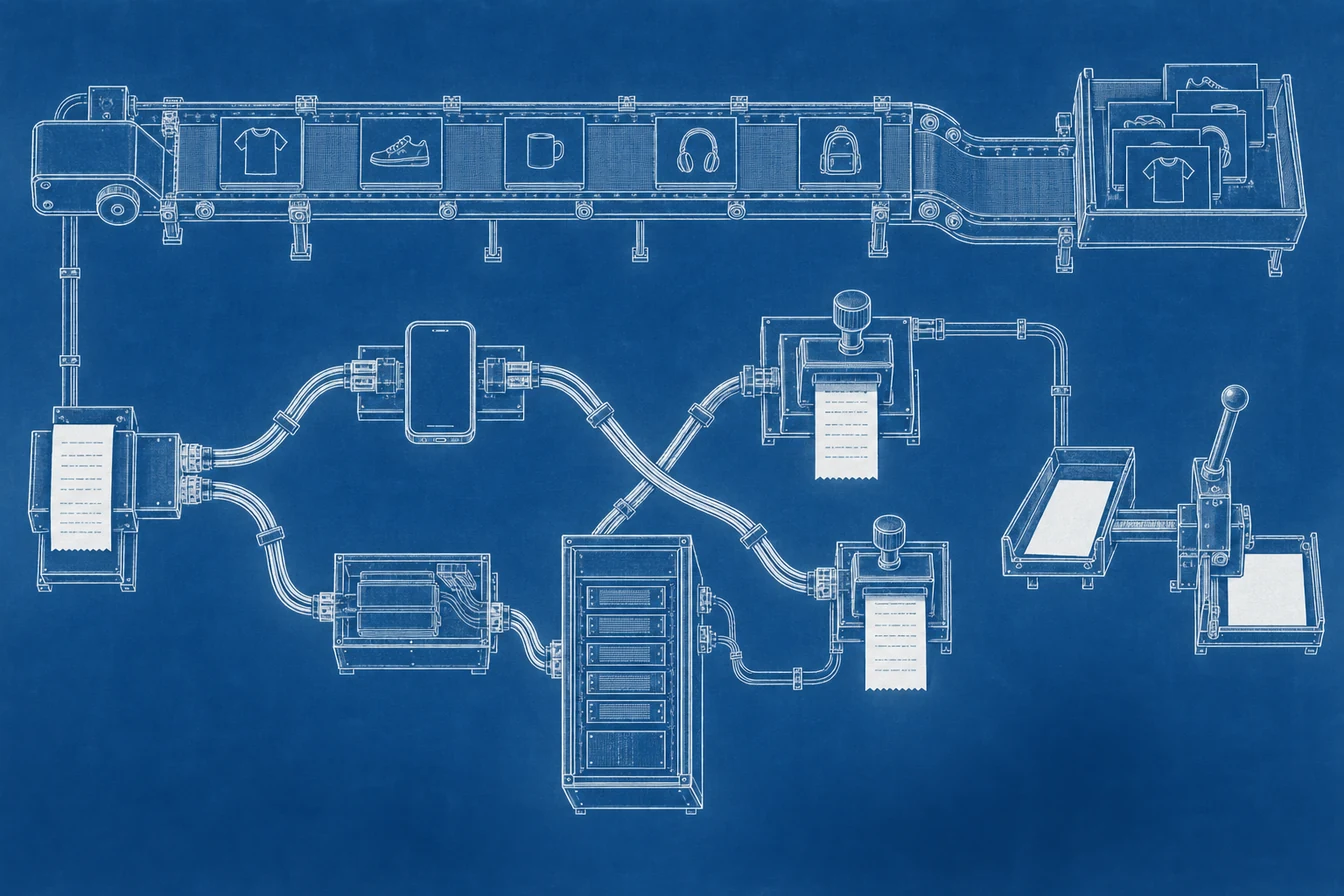
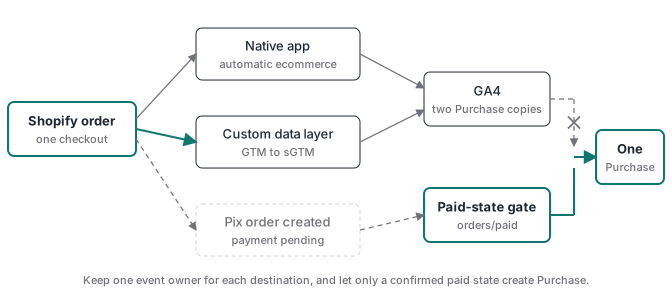
Shopify sGTM duplicate events usually have a simple cause: more than one system believes it owns the same ecommerce event. The Google & YouTube app can send automatic GA4 events while a custom Google tag or data layer sends the same actions through GTM and a server container. Facebook and Instagram by Meta can do the same beside a custom Pixel and CAPI route. A Pix code can add a third problem when order creation is treated as payment confirmation.
The fix is not to delete every native app. Inventory each event owner, assign one owner per destination, and preserve the commerce services the apps also provide. For Google, that means protecting the Merchant Center product feed before changing the app. For Pix, it means creating Purchase only after the order is paid. The goal is one paid order, one stable transaction ID, and one counted Purchase in each destination.
Why does Shopify send the same GA4 event twice?
Shopify sends the same GA4 event twice when its native Google & YouTube integration and a custom implementation both write to the same property. Shopify’s GA4 setup guide says the app installs GA4 tags and automatically tracks selected ecommerce events. Your GTM container can also read Shopify’s customer events or a custom data layer, build a purchase, and send it through sGTM. Both paths are valid in isolation. Together, they create two event owners. A page reload, checkout extension, app embed, custom pixel, or old theme snippet can add more copies. GA4 can suppress repeated web purchases that carry the same transaction_id, but that protection does not repair duplicate page views, add-to-cart events, inconsistent transaction IDs, or two implementations with different parameters. Treat the tag inventory as the source of truth. The property ID alone does not tell you which code emitted the request.
Start with the browser Network panel. Filter for collect, trigger one clean test, and group requests by initiator and hostname. One copy may go directly to a Google collection domain while the custom copy uses your server hostname. That pattern proves split ownership. The sGTM debug ladder shows how to follow the custom copy from web execution to server receipt.
Where is the partner integration that seems to reappear?
The overlooked integration lives in Shopify, not in your GTM workspace or theme source. Open the Google & YouTube sales channel, go to Settings, and inspect the connected Google Analytics property. Connecting a GA4 property there installs Shopify’s automatic collection path. Disconnecting or removing a hard-coded Google tag elsewhere does not change that app connection. The reverse is also true: reconnecting the property during account maintenance can restore automatic ecommerce events without any GTM publish. That is why a duplicate can appear after a clean migration and leave no new container version to inspect. Call it a partner integration in the tracking inventory and record its property ID, owner, and change date. Then monitor the request initiator in a synthetic purchase check. If the direct request returns, the monitor should flag a second owner before reporting drifts for weeks.
Google’s Shopify connection guide treats Merchant Center, Google Ads, Google Analytics, and conversion tracking as separate connections inside the same app. Use that separation. If sGTM will own GA4, disconnect the GA4 property in the app rather than uninstalling the whole sales channel.
Why can uninstalling Google & YouTube damage Performance Max?
The Google & YouTube app is often doing two unrelated jobs: sending analytics events and synchronizing products to Merchant Center. Shopify states that the channel automatically syncs products and store information, while Google states that Shopping and retail Performance Max campaigns require an active product feed. If the app is the only feed source, uninstalling it to stop a duplicate tag removes the system keeping that catalog current. Product inventory can stop updating, become stale or ineligible, and disappear from the campaign’s available listing groups. The analytics issue may look fixed on the same day that product-serving begins to fall. Preserve the feed first. Either keep the app and disconnect only GA4, or stage another Merchant Center data source before removal. A staged replacement is not ready because it accepted credentials. It is ready when the expected products are synced, approved, current, and visible in the campaign’s product groups.
Use this migration order:
- Record the current Merchant Center account, feed owner, product count, approval state, and Performance Max listing groups.
- If the app must go, connect the replacement feed and complete one full product sync.
- Resolve missing identifiers, shipping, tax, policy, and landing-page errors before cutover.
- Confirm the replacement is the active source and that campaign product groups remain eligible.
- Only then remove the old feed owner and watch item count plus campaign serving.
This is a feed migration with an analytics change attached, not a tag cleanup.
How do native Meta events collide with a custom sGTM route?
Facebook and Instagram by Meta can connect a Meta pixel and set a customer data-sharing level inside Shopify. Shopify’s Meta pixel guide explicitly warns that leaving theme pixel code beside the connected integration can produce duplicate or incorrect reporting. A custom sGTM build adds another route: the browser Pixel sends Purchase while a server tag sends the matching CAPI event. Meta can deduplicate that pair only when the event name and stable event_id identify the same business action. If the native integration creates its own identifier and your custom route uses another, both deliveries can remain countable. Choose one owner for the browser-server pair. Keep the native integration only when it owns the event contract, or disable its tracking path when the custom route owns it. Do not remove catalog or shop functions that the business still needs without checking them separately.
For a controlled custom route, use the final Shopify order ID or transaction ID as the Purchase event_id on both browser and server copies. Send it unchanged. The Meta CAPI deduplication guide explains why the same order-based value must cross both paths and how to run a negative control.
Why does Pix generation inflate Shopify purchases?
Generating a Pix code is not the same as receiving money. Shopify documents that additional payment methods can leave an order in Payment pending while the provider finishes processing, and recommends waiting for Paid before fulfillment. The webhook model makes the implementation choice explicit: orders/create fires when the order exists, while orders/paid fires when it is paid. Mapping the first topic straight to Purchase counts every generated code, including codes that expire or are abandoned. That inflates GA4 revenue and sends false optimization signals to ad platforms. Subscribe to orders/paid, or use the payment provider’s equivalent approved-state callback, and verify the current financial status before emitting. Then make the handler idempotent. Shopify exposes webhook delivery and event identifiers for deduplication, but the business key should still be stable across retries. Store a key such as destination, event name, and order ID before forwarding the conversion. A repeated webhook must return success without creating a second Purchase.
This is separate from browser-server deduplication. Webhook idempotency prevents your server from sending the same paid order twice. Destination deduplication merges the browser and server copies that you intentionally send for one paid order.
What is the safest audit sequence for Shopify tracking?
The safest sequence moves from business truth to each delivery receipt. Export paid Shopify orders for a fixed period and count distinct order IDs. Compare that count with distinct GA4 transaction_id values and Meta Purchase identifiers for the same period and time zone. A total above paid orders points to duplicate or premature events. A total below paid orders points to loss. Then test one new order and inspect every owner instead of editing the first tag you recognize. Check Shopify’s sales-channel connections, Customer events, custom pixels, app embeds, theme code, GTM, the sGTM preview, and webhook subscriptions. Record the destination, event names, property or pixel ID, transport host, event ID source, payment-state gate, and person responsible for each route. The resulting matrix should have one owner per event and destination, with an intentional browser-server pair only where both copies share the same deduplication key.
Use five controlled cases before the cutover is accepted:
- A paid card order creates one Purchase per destination with the final order ID.
- A generated but unpaid Pix code creates zero Purchase events.
- An approved Pix payment creates one Purchase after the paid transition.
- Reloading the order status page creates no additional Purchase.
- Redelivering the same webhook is acknowledged without another Purchase.
Finish outside the tracking tools. Confirm that Merchant Center still has the expected approved products and that the Performance Max listing groups are eligible. Then reconcile paid orders against destination events again after reporting delays settle. A successful request only proves that one endpoint accepted a payload. It does not prove that the event was unique, paid, counted, or available to bidding.
How should you migrate Shopify tracking to sGTM without losing data?
Move ownership in small, reversible steps. First document every current emitter and save the Merchant Center baseline. Next, build the custom data contract: canonical event name, order-based transaction ID, consent state, currency, value, and payment status. Route a test stream through sGTM and verify that the server client claims it, the correct tags fire, and each destination reports the event. Keep that stream out of production counting until the evidence is complete. Stage any replacement product feed and prove it before touching Google & YouTube. Then disconnect the duplicate GA4 path, publish the custom owner, and watch live requests plus settled reports. Handle Meta separately because its catalog connection and event connection are different concerns. Finally, switch the Pix source from order creation to paid confirmation and run the unpaid control. The GA4 conversion tracking guide explains why an event arriving in GA4 is still not proof that a purchase was real.
Advanced Tracking Academy gives media buyers and implementation teams prebuilt client-side and server-side containers for purchase tracking, including webhook-validated routes. The setup keeps the event contract visible, so you can prove which system owns Purchase and why it fired. Use that foundation to deliver one confirmed purchase to each platform, while keeping the Shopify services that feed the business intact.