
The Meta Conversions API Gateway is a hosted, self-serve service that sends your website events to Meta from a server instead of only from the browser pixel. You point it at a server you provide, the Gateway receives the events your pixel already fires, and it forwards them to Meta over a server-to-server connection that ad blockers and browser privacy features cannot see. Meta built it so advertisers without a developer can get the benefits of the Conversions API without standing up a full server-side tagging setup.
That’s the definition. The reason this article exists is the question it creates. If the Gateway already does server-side Meta tracking for you, do you still need a server-side GTM container? The short answer is that the Gateway is fast and Meta-focused, while a server container is slower to set up but platform-neutral and far more controllable. Which one wins depends on whether Meta is the only platform you advertise on and how much control you want over the data.
If you need the implementation path before the comparison, start with the Conversions API Gateway setup guide. It covers the Pixel prerequisite, Gateway hub, first-party domain, validation checks, current hosting cost, and the limits that matter during handoff.
I run tracking implementations for clients, and I built Advanced Tracking Academy around the server containers I deploy in production. This guide covers what the Conversions API Gateway actually is, how it compares to a server-side GTM container, where the “no developer” marketing oversimplifies things, and how to decide between them.
What is the Meta Conversions API Gateway?
The Conversions API Gateway (often shortened to CAPI Gateway) is Meta’s own hosted middleware for the Conversions API. The Conversions API itself is the server-to-server connection that sends conversion events to Meta. The Gateway is a prebuilt service that runs that connection for you, so you don’t write the integration or maintain the request logic yourself.
Here is how a single purchase moves through it.
- A visitor triggers the Meta Pixel in their browser, the same pixel you already run.
- The pixel sends the event to Meta, and also to your Gateway server on a host you provide.
- The Gateway enriches the event with hashed customer data and forwards it to Meta over a server-to-server connection that bypasses browser blockers.
The Gateway handles a few things automatically that a hand-built Conversions API setup makes you do yourself. It generates the event_id used for deduplication, so the browser pixel event and the server event count as one purchase instead of two. It keeps itself updated as Meta changes the API. And it centralizes management across multiple pixels and domains from one place. For a Meta-only advertiser who wants server-side benefits without writing code, that is a genuinely useful package.
What’s the difference between the Conversions API, the Gateway, and the pixel?
These three names get used interchangeably and they are not the same thing, so it helps to separate them before going further.
The Meta Pixel is the browser tag. It fires on your website and sends events from the visitor’s browser. The Conversions API is the server-to-server protocol Meta exposes for sending those same events from your own server instead of the browser. The Conversions API Gateway is Meta’s hosted middleware that runs the Conversions API for you, so you configure a connection rather than writing and maintaining the API calls.
| Meta Pixel | Conversions API | Conversions API Gateway | |
|---|---|---|---|
| What it is | Browser tag that fires events on your site | The server-to-server protocol that sends events to Meta | Meta’s hosted middleware that runs the Conversions API for you |
| Where it runs | The visitor’s browser | Your server | A server you provide, running Meta’s middleware |
| What blocks it | Ad blockers, ITP, ATT prompts | Much less, because it is server-side | Much less, because it is server-side |
| Who builds the integration | You place the tag | You write or host the integration | Meta provides the integration, you provide the host |
The practical version: you already have the pixel. The Conversions API is the path you would build yourself to get server-side delivery. The Gateway is a prebuilt version of that path that Meta runs for you, on the condition that Meta-only delivery is enough for your business.
Why server-side tracking exists in the first place
Server-side tracking exists because the browser pixel lost ground. Safari’s Intelligent Tracking Prevention caps the first-party cookies the pixel relies on. Firefox blocks known tracking scripts. Ad blockers strip the Meta Pixel entirely on a meaningful share of desktop browsers. And after iOS 14.5, App Tracking Transparency meant a large portion of in-app traffic stopped passing the identifiers the pixel needed. Each one quietly deletes conversions your ad actually earned.
The Conversions API recovers them by sending the same events from your server, where blockers and consent prompts cannot intercept the request. Sending from the server is only half of it, though. The other half is how confidently Meta can tie each event back to a real account, and that is what Event Match Quality measures.
Event Match Quality is the 0 to 10 diagnostic Meta shows in Events Manager for website events sent through the Conversions API. It reflects the customer information attached to each event and how useful that information is for matching the event to a Meta account. A higher rating signals stronger matching potential, not a guaranteed campaign result, and Meta does not publish one target that fits every account and event type. What moves the rating is the data you attach: a hashed email and phone captured at the moment of conversion, the ad click ID, the browser cookie ID, your own customer ID, and the IP address and user agent of the request. The personal fields are normalized and SHA-256 hashed on your server before they leave; the click and browser identifiers travel unhashed. The EMQ score guide separates legitimate event-by-event coverage differences from fields that are actually missing. Hashing is pseudonymization, not anonymization, so the consent and data-protection obligations around those fields still apply.
The part worth holding on to is that the match-quality ceiling is set at collection, not at delivery. No server-side path can manufacture a hashed email for a checkout form that never asked for one. The Conversions API, the Gateway, and a server-side GTM container all send the same kinds of parameters; what differs is how much control you get over which fields leave your server and how consistently the checkout and CRM data reaches them. The full parameter table and the hashing rules are in the Facebook Conversions API guide.
The Gateway is one way to get those server events flowing. A server-side GTM container is another. The rest of this article is about how to choose between them.
How the Gateway works, and what you still have to host
This is the part the landing pages hurry past. The Gateway is described as code-free and no-developer, and on the configuration side that is roughly true. You are not writing the Conversions API calls or maintaining a tagging container’s logic.
But the Gateway still has to run somewhere. Meta does not host it for you. You deploy the Gateway on your own cloud server, which is why you see questions about running it on AWS, on Google Cloud, or on a managed server-side host. The “code-free” part is about configuration and maintenance, not about infrastructure. A server with an always-on endpoint, an SSL certificate, and capacity for your traffic is still on your plate.
In practice that means you are choosing a host either way, whether you run the Gateway or a full server container. A managed server-side host like Stape, where I run client containers, hosts both. The Gateway sits on one plan, a full server-side GTM container on another. The infrastructure decision is the same. What changes is how much tracking logic sits on top of it.
How the Gateway gets set up
This is roughly what happens when you turn the Gateway on, and it sets up the hosting question that follows.
- In Events Manager, inside Meta Business, you start a Conversions API Gateway connection for the dataset your pixel reports into. The connection and its settings live in the Gateway hub, the surface Meta gives you for managing the data source, the sharing parameters, and the host.
- The Gateway provisions a system user and an access token for that dataset. The token is what authorizes your server events to land in the right ad account.
- You connect your pixel as the data source and point it at the Gateway endpoint. From then on the browser event is also routed to your Gateway server, and you choose which customer information parameters the Gateway may attach through automatic advanced matching.
- The Gateway generates the
event_idthat deduplicates the browser event with the server event, so one purchase counts as one purchase. - You give the Gateway a place to run. That part is on you, not Meta.
None of those steps requires writing the Conversions API calls by hand. The work you don’t get to skip is the last one, providing and maintaining the server, which is the same hosting decision you’d face with a full container. For most non-developers the route there is a managed server-side host rather than a raw cloud instance.
Conversions API Gateway vs server-side GTM
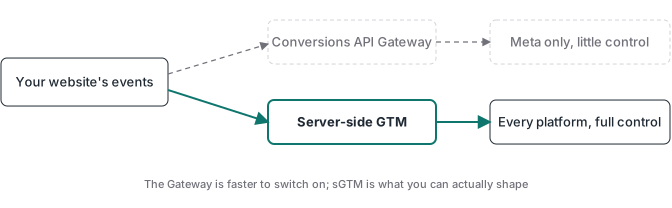
This is the comparison that decides the architecture. The Gateway and a server-side GTM container both solve the same core problem, getting your events to Meta from a server instead of a browser pixel. They differ in how much control you get and in how many platforms they reach.
| Conversions API Gateway | Server-side GTM container | |
|---|---|---|
| Where it runs | Meta-managed middleware on a host you provide | Your own GTM server container on a host you provide |
| Platforms it sends to | Meta only | Meta, Google Ads, TikTok, GA4, and any API |
| Deduplication with the pixel | Automatic, event_id generated for you | You configure it with a shared event_id |
| Customer data for matching | Automatic advanced matching, from what the page has | Server-side, including checkout and CRM data the page never sees |
| Custom logic per platform | Limited | Full control over every field each platform receives |
| Webhook validation against real payments | Not in the turnkey flow | Native if you build it in |
| Updates and maintenance | Automatic | You maintain the tags |
| Setup for a non-developer | Fast, largely configured for you | Slower from scratch, about an hour with a prebuilt container |
| Best fit | Meta-only advertisers who want speed | Multi-platform tracking that needs control |
Read the table one way and the Gateway looks like the clear winner. Less setup, automatic dedup, nothing to maintain. Read it the other way and the trade-off shows up. The Gateway only talks to Meta, gives you little control over the data each platform receives, and can’t easily run the custom validation that keeps junk events out of your optimization.
The honest summary is that the Gateway optimizes for time-to-live on Meta, and a server container optimizes for control across every platform. If you only ever run Meta ads, the time savings are real. The moment Google Ads, TikTok, or GA4 enter the picture, a server container does all of them from the same server the Gateway would have occupied.
When the Gateway is enough
The Gateway is the right call in a specific, common situation. You advertise on Meta and only Meta. You want the recovery and match-quality gains of server-side tracking without a multi-week build, and you don’t need custom logic between your events and Meta. Fine to let the Gateway own the deduplication and updates.
Plenty of direct-to-consumer brands and lead-gen advertisers sit here. If Meta is your whole paid channel, the Gateway gets you server-side Meta tracking live in hours, and that is a real result for not much work. You give up control and you’re locked to one platform, but you also skip the learning curve of a tagging container.
The one thing I’d still check even here is purchase quality, which is the next section.
When a server container is the better choice
A server-side GTM container wins when any of these is true.
You run ads on more than Meta. The same server container that feeds the Conversions API also feeds Google Ads, the TikTok Events API, and GA4. One server, every platform, configured once. On the Google Ads side that includes offline conversion tracking, which credits settled payments and closed deals back to the campaign that earned them. The Gateway can’t do this. If you adopt the Gateway for Meta and later add Google, you end up running the Gateway and a separate server path, which is more to maintain than a single container.
Control over the data contract. In a server container you decide, per platform, exactly which fields leave your server. The Gateway gives you far less of that.
You need events you can trust against settled revenue. This is the one that matters most in audits, and the Gateway’s turnkey flow doesn’t handle it. More on that below.
For the wider case for a server container and where it fits a multi-platform stack, the server-side GTM guide walks through how the container works and where to host it, and the full server-side tracking guide covers the data-decay problem it solves.
What the Conversions API Gateway costs
Meta charges nothing to receive events through the Gateway, same as the raw Conversions API. The cost is hosting, because you provide the server. A managed host like Stape lists Gateway hosting at around $10 per month per pixel, which is the simple comparison point. A full server-side GTM container on a managed host starts a little higher, roughly $20 per month per site, but it covers every platform instead of only Meta.
The other cost is your time, and it points in the opposite direction of the monthly fee. The Gateway is fast to set up and slow to customize. A server container is slower from scratch, days to weeks the first time, but a prebuilt container compresses that to about an hour. So the real cost question is not the hosting. It’s how much you value being able to add Google and TikTok later, or validate purchases, without starting over.
What the Gateway can’t do: webhook validation
This is the limitation worth stating plainly, because it’s where the “just use the Gateway” advice breaks down for anyone selling something.
The Gateway, like any Conversions API path that trusts the pixel, sends a purchase event when the visitor reaches the thank-you page. Refresh the page and it fires again. A bot hits the URL and it fires. The payment fails after a redirect and it fires anyway. Now Meta is optimizing toward people who loaded a confirmation page, not people who paid.
The fix is to make the payment gateway the source of truth. Your processor sends a webhook when a charge actually settles, your server matches it to the stored browser session, and only then does the event go to Meta. Every purchase Meta receives maps to real money. With Stripe, that means handling the payment webhook so a settled charge, not a thank-you page load, is what triggers the conversion. That validation layer is custom logic, and it’s exactly the kind of thing a turnkey Gateway isn’t built to run, while a server container is.
It’s also the architecture every ATA container ships with, because thank-you-page events stopped being trustworthy years ago and no amount of server-side routing fixes a purchase that never happened.
Where to go from here
If you’ve decided the Gateway fits your Meta-only setup, the hosting question is the main thing left, and the route most non-developers take is a managed host. If you run more than Meta, or you want events validated against real payments, a server-side GTM container is the more flexible foundation, and the Meta Conversions API guide covers the deduplication and webhook-validation steps in detail.
And if you’d rather deploy than build: the ATA containers are prebuilt server-side GTM setups with webhook validation already wired in. Import, configure, and go live in under an hour, $27 per month with the price locked while you stay subscribed.